

Session chairs - all sessions
Thank you for accepting the invitation and providing your time to be a session chairperson at the 2026 Advancing Earth Observation Forum. You will have received an email indicating details of your session (e.g. date, time, room location, session title, session presentation details). If you have not received the details of your session please contact the committee.
Your speakers have received a similar email to you, with instructions to load their presentations to Google Drive (link here) prior to the conference, or to visit the speaker preparation room before their session during the following times:
10 October, 8am - 5pm
11 October, 8am - 5pm
12 October, 8am - 1pm
PLEASE NOTE – speakers cannot upload presentations, or run their talk from USB drives in the presentation rooms.
Your primary role and responsibilities are to ensure the session runs effectively for both the presenters and the audience. This covers the following:
working with speakers to ensure they are set up properly prior to the session;
introducing/closing the session;
keeping all talks to time;
managing questions and answers;
enabling easy transition between speakers;
working with IT support to address any technical challenges;
post-session, providing feedback to Program Committee if there is any feedback and items that need to be addressed.
Before the session
Check over the speakers and talks in your session and ensure you understand names, titles and primary content;
Review the introductory and closing scripts below;
If provided by the speaker, biographies for each speaker in your session are included in the email with your session allocation; please let us know if you have not received these.
At the Forum on the day of your session
On arrival, please register at the registration desk;
Once you have registered, go to the speaker preparation room to check that all of the talks in your session have been preloaded;
Arrive at your session room at least 15 minutes ahead of scheduled start time;
Meet your session speaker(s) in the session room prior to your session;
At this time, you should check that the room is set up appropriately and that the speakers are familiar with the equipment.
Choose a seat at the front of the room where the presenters can easily observe you.
A link to each presentation will be included on the session holding slide (linked to the presenter’s name). Clicking this link is how the presentation is started. Please show this to the speaker(s).
Check in with each speaker in your session and ask if they have any preference for how they would like to be introduced.
You may clarify title and organisation for speakers who haven’t provided that information.
When all speakers are present, or individually you can explain how the session will run, including:
Presenter’s speaking time and warning times (see table below);
how questions will be managed;
dealing with speaker no-show and technical issues;
How their presentation will appear on podium screen after you start it and how they control slides, laser pointer and use the microphone;
Times for Each Session Type :
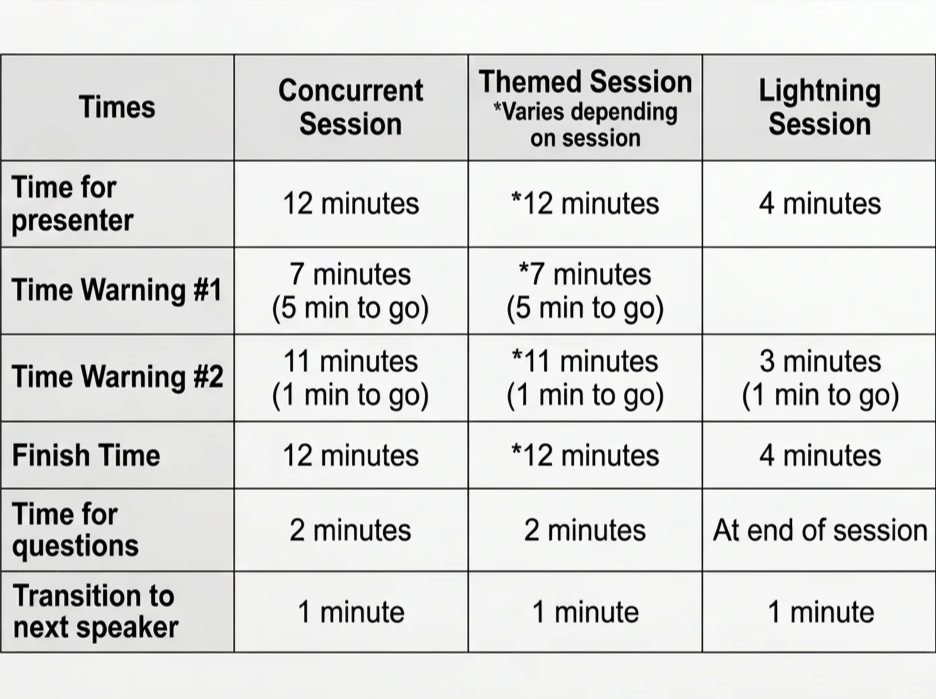
During the Session
Just before session start time, conduct final check with all speakers and check slide/display/audio. There will be a roving audio-visual technician available. Please request assistance if you have any concerns regarding the audio-visual equipment.
Briefly introduce yourself and welcome the audience. Announce that you will be chairing the session.
Open the session with a brief introduction of the theme and the speakers
Special announcements may need to be made at the beginning or end of the session. Announcement notices will be placed at your position at the head table or lectern.
Introduce each speaker before their presentation (name, job title and organisation will suffice), as all biographies are available to view on the conference app at delegates’ leisure.
Speakers must not exceed their allocated time (see the table above for concurrent, themed session and lightning talk times).
Please refer to the above table for allocated question times from the audience.
For lightning talks, questions will be held at the conclusion of all Lighting talks in that session.
Please use the display cards provided to you to prompt presenter when their allocated time is nearing completion (prompt times are given in the table above)
At the conclusion of each talk, thank the speaker and call the next speaker and change to their title slide
Managing questions and discussions
Session chairs are required to invite questions from the audience, repeat the question if it was difficult to hear, and lead and stimulate discussion for each presentation if time permits.
Ask audience members who pose questions to identify themselves with name and organisation.
Be prepared to ask questions yourself if no questions are forthcoming from the audience
What to do if…
If you experience equipment trouble:
Let the volunteer in your room know so they can help you locate the audio-visual technician
If a presentation has been withdrawn or the speaker does not appear:
Do not start the next presentation until the time listed in the program
We ask that you keep to the schedule, as there are multiple sessions running at once, and attendees plan their moves between rooms based on the published times.
Use the unexpected gap however works best (e.g. an early break, extra Q&A for the previous talk)
Please advise the registration desk of any no-shows - you can ask the room volunteer to do this, or inform the desk at the end of your session.
Unexpected situations (a talk going off-topic, running long, etc.):
Use your judgment to adjust the flow while keeping later talks on schedule.
After the Session
Thank all of the speakers for presenting.
Report back briefly to the organizing committee if anything notable happened (technical issues, no-shows, etc.).